|
|||||||||||||||||||||||||||||||||||||||||||||||||||||||||||||||||||||||||||||||||||||||||||||||||||||||||||||||||||||||||||||||||||||||||||||||||||||||||||||||||||||||||||||||||||||||||||||||||||||||||||||||||||||||||||||||||||||||||||||||||||||||||||||||||||||||||||||||||||||||||||||||||||||||||||||||||||||||||||||||||||||||||||||||||||||||||||||||||||||||||||||||||||||||||||||||||||||||||||||||||||||||||||||||||||||||||||||||||||||||||||||||||||||||||||||||||||||||||||||||||||||||||||||||||||||||||||||||||||||||||||||||||||||||||||||||||||||||||||||||||||||||||||||||||||||||||||||||||||||||||||||||||||||||||||||||||||||||||||||||||||||||||||||||||||||||||||||||||||||||||||||||||||||||||||||||||||||||||||||||||||||||||||||||||||||||||||||||||||||||||||||||||||||||||||||||||||||||||||||||||||||||||||||||||||||||||||||||||||||||||||||||||||||||||||||||||||||||||||||||||||||||||||||||||||||||||||||||||||||||||||||||||||||||||||||||||||||||||||||||||||||||||||||||||||||||||||||||||||||||
| experience the adventure | |||||||||||||||||||||||||||||||||||||||||||||||||||||||||||||||||||||||||||||||||||||||||||||||||||||||||||||||||||||||||||||||||||||||||||||||||||||||||||||||||||||||||||||||||||||||||||||||||||||||||||||||||||||||||||||||||||||||||||||||||||||||||||||||||||||||||||||||||||||||||||||||||||||||||||||||||||||||||||||||||||||||||||||||||||||||||||||||||||||||||||||||||||||||||||||||||||||||||||||||||||||||||||||||||||||||||||||||||||||||||||||||||||||||||||||||||||||||||||||||||||||||||||||||||||||||||||||||||||||||||||||||||||||||||||||||||||||||||||||||||||||||||||||||||||||||||||||||||||||||||||||||||||||||||||||||||||||||||||||||||||||||||||||||||||||||||||||||||||||||||||||||||||||||||||||||||||||||||||||||||||||||||||||||||||||||||||||||||||||||||||||||||||||||||||||||||||||||||||||||||||||||||||||||||||||||||||||||||||||||||||||||||||||||||||||||||||||||||||||||||||||||||||||||||||||||||||||||||||||||||||||||||||||||||||||||||||||||||||||||||||||||||||||||||||||||||||||||||||||||
|
|||||||||||||||||||||||||||||||||||||||||||||||||||||||||||||||||||||||||||||||||||||||||||||||||||||||||||||||||||||||||||||||||||||||||||||||||||||||||||||||||||||||||||||||||||||||||||||||||||||||||||||||||||||||||||||||||||||||||||||||||||||||||||||||||||||||||||||||||||||||||||||||||||||||||||||||||||||||||||||||||||||||||||||||||||||||||||||||||||||||||||||||||||||||||||||||||||||||||||||||||||||||||||||||||||||||||||||||||||||||||||||||||||||||||||||||||||||||||||||||||||||||||||||||||||||||||||||||||||||||||||||||||||||||||||||||||||||||||||||||||||||||||||||||||||||||||||||||||||||||||||||||||||||||||||||||||||||||||||||||||||||||||||||||||||||||||||||||||||||||||||||||||||||||||||||||||||||||||||||||||||||||||||||||||||||||||||||||||||||||||||||||||||||||||||||||||||||||||||||||||||||||||||||||||||||||||||||||||||||||||||||||||||||||||||||||||||||||||||||||||||||||||||||||||||||||||||||||||||||||||||||||||||||||||||||||||||||||||||||||||||||||||||||||||||||||||||||||||||||||
| Using Microsoft Flight Simulator X | |||||||||||||||||||||||||||||||||||||||||||||||||||||||||||||||||||||||||||||||||||||||||||||||||||||||||||||||||||||||||||||||||||||||||||||||||||||||||||||||||||||||||||||||||||||||||||||||||||||||||||||||||||||||||||||||||||||||||||||||||||||||||||||||||||||||||||||||||||||||||||||||||||||||||||||||||||||||||||||||||||||||||||||||||||||||||||||||||||||||||||||||||||||||||||||||||||||||||||||||||||||||||||||||||||||||||||||||||||||||||||||||||||||||||||||||||||||||||||||||||||||||||||||||||||||||||||||||||||||||||||||||||||||||||||||||||||||||||||||||||||||||||||||||||||||||||||||||||||||||||||||||||||||||||||||||||||||||||||||||||||||||||||||||||||||||||||||||||||||||||||||||||||||||||||||||||||||||||||||||||||||||||||||||||||||||||||||||||||||||||||||||||||||||||||||||||||||||||||||||||||||||||||||||||||||||||||||||||||||||||||||||||||||||||||||||||||||||||||||||||||||||||||||||||||||||||||||||||||||||||||||||||||||||||||||||||||||||||||||||||||||||||||||||||||||||||||||||||||||||
|
|
|||||||||||||||||||||||||||||||||||||||||||||||||||||||||||||||||||||||||||||||||||||||||||||||||||||||||||||||||||||||||||||||||||||||||||||||||||||||||||||||||||||||||||||||||||||||||||||||||||||||||||||||||||||||||||||||||||||||||||||||||||||||||||||||||||||||||||||||||||||||||||||||||||||||||||||||||||||||||||||||||||||||||||||||||||||||||||||||||||||||||||||||||||||||||||||||||||||||||||||||||||||||||||||||||||||||||||||||||||||||||||||||||||||||||||||||||||||||||||||||||||||||||||||||||||||||||||||||||||||||||||||||||||||||||||||||||||||||||||||||||||||||||||||||||||||||||||||||||||||||||||||||||||||||||||||||||||||||||||||||||||||||||||||||||||||||||||||||||||||||||||||||||||||||||||||||||||||||||||||||||||||||||||||||||||||||||||||||||||||||||||||||||||||||||||||||||||||||||||||||||||||||||||||||||||||||||||||||||||||||||||||||||||||||||||||||||||||||||||||||||||||||||||||||||||||||||||||||||||||||||||||||||||||||||||||||||||||||||||||||||||||||||||||||||||||||||||||||||||||||




|
The ability to fly has fascinated mankind since time immemorial. Just over 220 years ago, the first balloon flight took place. Just over 100 years ago the Wright brothers along with many other pioneers took to the air in the first powered airplane flights. Since then, the field of aviation has exploded. For those who want to fly but are unable for some reason or other, or for just practicing when not in the cockpit, the advent of personal computers brought us Flight Simulator for the PC. The latest version of this software is Flight Simulator X by Microsoft. With this version, you can now experience the flying of and systems of aircraft from the simplest ultralight to the most complex airliner, all in the comfort of your living room. And thanks to the expandability built into the software and the hard work of many, many enthusiasts, the realism of the systems, flight models, and scenery has grown tremendously. Flying'sCool! uses an enhanced version Microsoft Flight Simulator combined with educational tools and hardware which simulate the controls of an airplane to introduce its customers to what it is like to fly an airplane and what they need to know to do it. Compiled here are lists of available aircraft, hardware, and scenery addons to enhance the New England, USA area in Microsoft Flight Simulator X. I have deliberately tried to show only those addons I use or know to be best in class, so as not to flood you with more options than you can imagine. There is also a list of links to many web sites run by enthusiasts and companies, offering for free or for sale, software which further enhance Flight Simulator. Finally, a number of tutorials on how to use and enhance Flight Simulator have been included. These pages are updated frequently, so come back often. And if you have any questions regarding anything about Flight Simulator, from flying to installation or if you are searching for a particular scenery file, don't hesitate to join us either at the forums or contact me directly by email. Thanks to Microsoft's development team, however, while many of these addons were designed for the last version - Flight Simulator 2004, you may find they work better than they did in FS2004. Also, the available default aircraft list is quite different from that in FS2004. But if you own a copy of FS2004, you can use those missing aircraft from FS2004 in FSX. With each class, you'll get a free DVD with much of this software ready to install on your system, and directions on how to obtain and install the rest. Flying'sCool! is not associated in any way with Microsoft (tm) or its product groups. |
Microsoft Flight Simulator installation
for flying in the Northeastern US and Eastern Canada
I've collected links to a number of scenery and support addons for Microsoft Flight Simulator 2004: A Century of Flight for flying in the Northeastern US and Eastern Canada, as well as a number of sceneries for other areas around the U.S.. If you are looking for scenery for other locations, I suggest you also go here or here. I highly recommend purchasing Ultimate Terrain - USA (and also Ultimate Terrain - Canada and Alaska if you plan to fly up north), as well as FSGenesis US Landclass. The freeware FSGenesis Mesh (see below) is excellent, but unsupported. But I have so far only found a couple of very, almost unnoticeable issues in the Northeast. The mesh available for purchase from FSGenesis is under continual revision and is fully supported.
Freeware (All links to www.Avsim.com unless otherwise noted)(* - Not needed if Ultimate Terrain:USA is installed)(** - Not needed if Ultimate Terrain:Canada is installed)
| Mesh/Landclass/Water - Makes the ground elevation and lakes/rivers/roads, etc. more accurate | |||
| Description | Author | Filename | |
| Download | FreeFlow New England v1.0 | Scott Gridley | freeflow_new_england_v1.0.zip |
| Download | FreeFlow New England v1.0 KBOS Fix | Scott Gridley | ffnekbos.zip |
| Download | **Canada Roads v2.0 | Joel Gill | canada_road_system.zip |
| Download | **Canada Roads v2.0 - British Columbia Update | Joel Gill | british_columbia_road_system.zip |
| Download | **Canada Roads v2.0 - New Brunswick Update | Joel Gill | new_brunswick_road_system.zip |
| Flightsim.com | *United States Roads and Railways file 1 | Raimondo Taburet | login and search for usaroad*.zip |
| Download | * Maine Coastlines | Jim Keir | Maine.zip |
| Download | * Long Island Coastlines | Dan Baisley | long_island_coastlines.zip |
| Download | * NY Lakes v1.2 | Peter Ricciardiello | nylakes12.zip |
| Download | Nova Scotia Landclass v2 | Rick Zenkner | nova_scotia_landclass.zip |
| Download | Quebec Landclass | Pascal Fleury | quebec_landclass.zip |
| Download | Ottawa Landclass | Roger Wensley | Ottland1.zip |
| Download | Beta evaluation version of USA Landclass | FSGenesis | |
| Enhanced Airports | |||
| Description | Author | Filename | |
| Download | KBOS v2.0 | George Grimshaw | boston_logan_1.1.zip |
| Download | Cape Cod Airports - KACK Nantucket, MA | William Shea | kack.zip |
| Download | Cape Cod Airports - KACK Nantucket, MA Fix | William Shea | kackfix.zip |
| Download | Cape Cod Airports - KMVY Martha's Vineyard, MA | William Shea | kmvy.zip |
| Download | Cape Cod Airports - 1B2 Katana Airpark, Martha's Vineyard, MA | William Shea | k1b2.zip |
| Download | Cape Cod Airports - KHYN Hyannis, MA | William Shea | khyn.zip |
| Download | Cape Cod Airports - KBID Block Island, RI | William Shea | kbid.zip |
| Download | KBDL - Bradley Airport, Windsor Locks, CT | Phil Chimbolo | bdl2005_v1-00.zip |
| Download | KBUF - Buffalo, NY | Simon Baldwin | buffalo.zip |
| Download | KROC - Rochester, NY | Simon Baldwin | rochester.zip |
| Download | KROC - Rochester, NY Fix | Simon Baldwin | rochester_fix.zip |
| Download | KISP - LI MacArthur, Islip, NY | Phil Perlman | kisp_fs2004v2.zip |
| Download | KISP - LI MacArthur, Islip, NY AFCAD | Phil Perlman | af2_kisp2.zip |
| Download | KLGA - LaGuardia Airport, NY, NY | Shehryar Ansari | lga2004.zip |
| Download | KLGA - LaGuardia Airport, NY, NY fix | Shehryar Ansari | lga2004fix.zip |
| Download | Airports of Newfoundland - AFCADs | Lee Brompton | lb_nfld.zip |
| Download | Airports of Vermont - AFCADs | Brian Gladden | vt_airports_04.zip |
| Download | 6B0 - Middlebury, VT | Robert Williams | 6b0_scen.zip |
| Download | CYHZ - Halifax, Nova Scotia | Steve Mosher, Craig Mosher | CYHZ_v10.zip |
| Download | CYQM - Moncton, New Brunswick | Steve Mosher, Craig Mosher | CYQM_v10.zip |
| Download | CYYT - St. John's, Newfoundland | Steve Mosher, Craig Mosher | CYYT_v10.zip |
| Download | CYHZ - Halifax, Nova Scotia AFCAD | Lee Brompton | lb_yhzxw.zip |
| Download | CYQM - Moncton, New Brunswick AFCAD | Lee Brompton | lb_yqmxw.zip |
| Download | CYYT - St. John's, Newfoundland AFCAD | Lee Brompton | lb_yytxw.zip |
| Download | FS2k4 Update for Mosher Brothers' CYHZ, CYQM, CYYT | Shane Strong | maritime.zip |
| Download | CYGK - Norman Rogers Airport Kingston, Ontario | Keith Murphy | cygk.zip |
| Download | CYQG - Windsor, Ontario | Garvin Barnicoat | cyqg_04.zip |
| Search | Quebec Short Hops Series - Search for files at www.avsim.com | Leon Louis | |
| Search | John Loney has recreated many, many airports in the Northeast US and elsewhere. | John B. Loney, Jr. | |
| Enhanced Scenery | |||
| Description | Author | Filename | |
| Download | Statue of Liberty | Daniel Buechter | liberty3.zip |
| Download | NYC Buildings updates | Tatu Kantomaa | nyc_obj3.zip |
| Download | Greater Toronto Part 1 | Team Flight Ontario | flight_ontario_part1.zip |
| Download | Greater Toronto Part 2 | Team Flight Ontario | flight_ontario_part2.zip |
| Download | Thunder Bay Ontario inc. CYQT & CKG8 v2 | Team Flight Ontario | Thunderbay2.zip |
| Essential Files | |||
| Description | Author | Filename | |
| Download | FSUIPC - This is a must!!! Be sure to get latest version. | Pete Dowson | fsuipc.zip |
| Download | Runway Textures | Nazim Ali Patel | airland1.zip |
| Download | Airport for Windows Textures - Needed for many scenery addons. | Tom Hiscox | Airport%20v2.60%20Textures.zip |
| Download | Airport & Scenery Designer Textures - Needed for many scenery addons. | Abacus | asdv21_textures.zip |
| Download | Gerrish Gray's Tree Library | Gerrish Gray | trees_v3.zip |
| Download | RWY 12 Scenery Design tool and library Be sure to download all libraries, too. |
Israel Roth and Seev Kahn | rwy12_program_v1.2.zip |
| Environment Addons - Try them out, see which ones you like. | |||
| Description | Author | Filename | |
| Download | TBD | Author | *.zip |
| Special Mention - Not in the NE, but too good to miss. | |||
| Description | Author | Filename | |
| Search | Holger Sandmann's Scenery addons and mesh; including scenery for NW US and Western Canada and Alaska, as well as new mesh for the Alps and Himalayas | Holger Sandmann | See this thread to determine which files you need |
Payware
| Payware Products you must have. | ||
| To Order | Description | Author |
| Ultimate Terrain: USA | Road/Water/Landclass Enhancement Kit for the USA | Scenery Solutions |
| Ultimate Terrain: Canada & Alaska | Road/Water/Landclass Enhancement Kit for Canada and Alaska | Scenery Solutions |
| Ultimate Terrain: Europe | Road/Water/Landclass Enhancement Kit for Europe | Scenery Solutions |
| US Landclass | Landclass Enhancement Kit for the USA | FSGenesis |
| 19m Mesh | Elevation Enhancement for the world | FSGenesis |
| Misty Fjords | Scenery enhancement for Alaska | Misty Moorings |
| Highly recommended Payware Products | ||
| To Order | Description | Author |
| Active Sky | Weather Enhancement | HiFi Simulation Software |
| Bird'sEyeView | Texture Replacement for the USA and World | BirdsEyeView |
| Flight Environment | Weather replacement textures | Peter Wilding |
| Ground Environment | Texture Replacement for the World | Peter Wilding & Anthony Vos |
| FS Water | Replacement water textures | Peter Wilding |
Microsoft Flight Simulator X installation
I've collected some links to a few my favorite aircraft available for Flight Simulator, both Freeware and Payware. This is just a small sampling of what is available. I highly recommend searching the many websites available for the aircraft you like. Many of the author's below have developed multiple aircraft. I've created links to those others where I could, and I suggest you search further as well. I list a number of great sites under the "Links" section. Notably Tom Gibson's "California Classics" for classic propliners is great, some of which are ready for FSX, Milton Shupe's aircraft look and work GREAT; and Jens Kristensen has released a plethora of very nice 1930's and '40's propliners for FSX. There are many others. My favorite download libraries to search are at Avsim, Flightsim.com, Simviation, and Sim-Outhouse I fly almost exclusively from the Virtual Cockpit view, which is the default now in FSX, so you will note that all the aircraft I have chosen here have a 3D Virtual Cockpit. I also HIGHLY recommend that you check out the TrackIR 4. I find it indispensable. Get $30 off on your purchase here.
Default Aircraft(Click on the name or button for a description of the aircraft. Use the selection boxes on the top row to filter by type.)
Reset Filters
| Flying'sCool! |
 |
 |
 |
 |
 |
 |
 |
 |
 |
 |
 |
 |
 |
 |
 |
 |
 |
| AirBus A321 |
 |
● | ● | ● | |||||||||||||
| AirCreation SL450 Ultralight |
|
● | ● | ||||||||||||||
| Beechcraft B-58 Baron |
|
● | ● | ● | |||||||||||||
| Beechcraft King Air 350 |
|
● | ● | ● | ● | ||||||||||||
| Bell 206 |
|
● | ● | ● | |||||||||||||
| Boeing 737-800 |
|
● | ● | ● | |||||||||||||
| Boeing 747-400 |
|
● | ● | ||||||||||||||
| Bombardier Learjet 45 |
|
● | ● | ● | ● | ||||||||||||
| Bombardier CRJ 700 |
|
● | ● | ● | ● | ● | |||||||||||
| Cessna 172 |
|
● | |||||||||||||||
| Cessna 208 |
|
● | ● | ● | ● | ● | |||||||||||
| DHC-2 Beaver Floatplane |
|
● | ● | ● | ● | ||||||||||||
| DG 808S 18 Meter Sailplane |
|
● | |||||||||||||||
| Douglas DC-3 |
|
● | ● | ● | ● | ● | ● | ||||||||||
| Extra 300 |
|
● | ● | ||||||||||||||
| Grumman G-21A Goose Amphibian |
|
● | ● | ● | |||||||||||||
| Maule M7-260C Super Rocket |
|
● | ● | ||||||||||||||
| Mooney Bravo |
|
● | |||||||||||||||
| Piper J3 Cub |
|
● | ● | ||||||||||||||
| Robinson R22 |
|
● | ● |
Freeware Aircraft
I've collected here a sampling of what I think are some of the best freeware aircraft for FSX in a wide range of categories. I have installed, modified if necessary, and tested each of them in FSX. Look for my tutorials on what I've done to those planes not designed for FSX to make them work in FSX.
(Click on the name to download the aircraft. Use the selection boxes on the top row to filter by type.)
(All download links to www.Avsim.com unless otherwise noted) - Don't forget to search for repaints, too!
 - FSX ready version available. Others may require some editing to work in FSX.
Reset Filters
Payware Aircraft
Here is a sampling of payware aircraft either currently available for FSX, or which are currently in development for FSX.
(Click on the name to purchase the airplane. Use the selection boxes on the top row to filter by type.)
Reset Filters
| Flying'sCool! |
|
|
|
|
|
|
|
|
|
|
|
|
|
|
|
|
|
| ATR 72-500 - Flight One (In Progress) |
|
● | ● | ● | ● | ||||||||||||
| Beechcraft T-34 - Carenado |
|
● | ● | ● | |||||||||||||
| Beechcraft B-200 - Aeroworx |
|
● | ● | ● | ● | ● | |||||||||||
| Boeing 737-600 - PMDG (In Progress) |
|
● | ● | ||||||||||||||
| Boeing 747-400 - PMDG (In Progress) |
|
● | ● | ● | |||||||||||||
| Boeing 757-200 - CaptainSim |
|
● | ● | ||||||||||||||
| Boeing 767-400 - Level-D Released! |
|
● | ● | ||||||||||||||
| Cessna 182 RG - Carenado |
|
● | |||||||||||||||
| Cessna 206 - Carenado |
|
● | ● | ● | |||||||||||||
| Cirrus SR-20/22 - Eaglesoft |
|
● | |||||||||||||||
| Decathalon - RealAir Simulations |
|
● | ● | ||||||||||||||
| DHC-2 Beaver - Aerosoft |
|
● | ● | ● | ● | ● | ● | ● | |||||||||
| Douglas R4D (DC-3) - MAAM-Sim |
|
● | ● | ● | ● | ||||||||||||
| Lockheed C-130 - CaptainSim (In Progress) |
|
● | ● | ● | ● | ||||||||||||
| NA P-51 Mustang - Wings of Power |
|
● | ● | ||||||||||||||
| NA B-25 Mitchell - MAAM-Sim |
|
● | ● | ||||||||||||||
| Piper Cherokee 180 - Carenado |
|
● | |||||||||||||||
| Piper Archer II - Carenado |
|
● | |||||||||||||||
| Piper Archer - Dreamfleet |
|
● | |||||||||||||||
| Piper Warrior - Australian Simulations |
|
● | |||||||||||||||
| Piper Seneca II - Just Flight. |
|
● | ● | ● | |||||||||||||
| SIAI SF260 - RealAir Simulations |
|
● | ● | ||||||||||||||
| Supermarine Spitfire - RealAir Simulations |
|
● | ● | ||||||||||||||
| Vought Corsair - Aeroplane Heaven |
|
● | ● |
Installing Microsoft Flight Simulator
Daunted by the amount of software available and wondering how to get a good, working installation installed?
Click Here for a step by step process sheet I use when I install Microsoft Flight Simulator on a system. In order to understand this process, you must be familiar with moving and copying files in Windows. Please see FSX Directory Structure for a description of where FS9 expects to find the files you will be installing. If you are not familiar with how to manipulate and move files around, I offer services to help you install the software. Give me a call and we can set up an agreement and I'll help you get set up. I charge $25/hour ($15 minimum on first call), or you can choose a package installation deal. Quick email help is free. The references to Disk1 and Disk2 are the disks I give away with my class, but all the files listed below, except those that are payware, are freeware available at www.Avsim.com and www.flightsim.com and other sites. FS9 is the directory you installed Flight Simulator.
Installation tips: AircraftInstallation tips: Scenery
Whenever you are installing software, it is a good idea to back up the files which are about to be overwritten with newer versions, or to deactivate instead of deleting files which are no longer needed. To deactivate a file, you need only change its extension to something unrecognizable to FS. And make sure to VERY CAREFULLY follow the author's installation instructions in every addon you install. You will almost always find a readme file with each addon you download.
Aircraft: (top)
Downloaded aircraft come in two forms, those with self-installers, and those in
.zip files that you need to install. In the end, they both install the
same thing. They will typically contain files for the Aircraft, Effects,
and Gauges directories, and every so often a few files in the FS9\Textures
directory (see
FSX Directory Structure).
Always be careful to read the installation instructions. I'll cover
installation of aircraft in two steps, that of .zip files, and that of
self-installers.
Zip Files: Open the zip file. They will come in many different variations of how the author stored the files in the zip file. Look for a directory containing the aircraft directories and place this directory in FS9/Aircraft. You may want to edit the aircraft.cfg file to modify the manufacturer, type, and variation to your liking. Then look for any gauges and/or effects files you'll need to install. Often, they will have their own directories that you can just copy their contents to the FS9/Gauges and FS9/Effects directories respectively. Sometimes, you'll find gauge files in the Aircraft\PlaneXXX\Panel directory that need to be put in the main FS9\Gauges directory. Finally, once the plane is installed, I'll run FlightSim Manager and use its diagnostic tools to make sure all the gauges and effects and components have been correctly installed. This should be all you need to do to install the aircraft.
Self-Installers: Self-installers can be a good thing. They offer the ability to ease installation for those unfamiliar with the process. They usually allow you to uninstall the product when you don't want it any more. For many reasons, however, I prefer to install most addons in FS9 by hand. For instance, an uninstaller may delete a gauge that is being used by another aircraft. So for payware aircraft, mostly out of fear of screwing up the security, I'll just use the installer as it was designed. But for most freeware aircraft, I'll normally install the aircraft to C:\wutemp\Flight Simulator 9, check out what files were installed, and then install them where they need to go. This way, I won't accidentally overwrite any existing files that may be newer, and it gives me more control over the installation. After that, as above, I'll run FlightSim Manager to make sure the installation is ok.
Definitely check out FSX Directory Structure to understand the directory structure of Aircraft, and look through a few aircraft.cfg files to become more familiar with how this structrue works.
In Flight Simulator X, the procedure is basically the same, the only difference now being that the aircraft directory is now in the FSX\SimObjects\ directory. Everything else is pretty much the same, except that the user now has more control over where files can be stored. I'll write more about that after the SDK has been released.
Scenery: (top)
When adding scenery to Flight Simulator (FS), you must tell FS where to find it. To do this, start FS and go to Settings/Scenery Library. You will see a screen which looks like this (fig. 1).
Use the "Add Area..." command to add new scenery libraries to your installation
once you have copied them appropriately to the Addon Scenery directory or
installed them with their installer (if they came with one)..
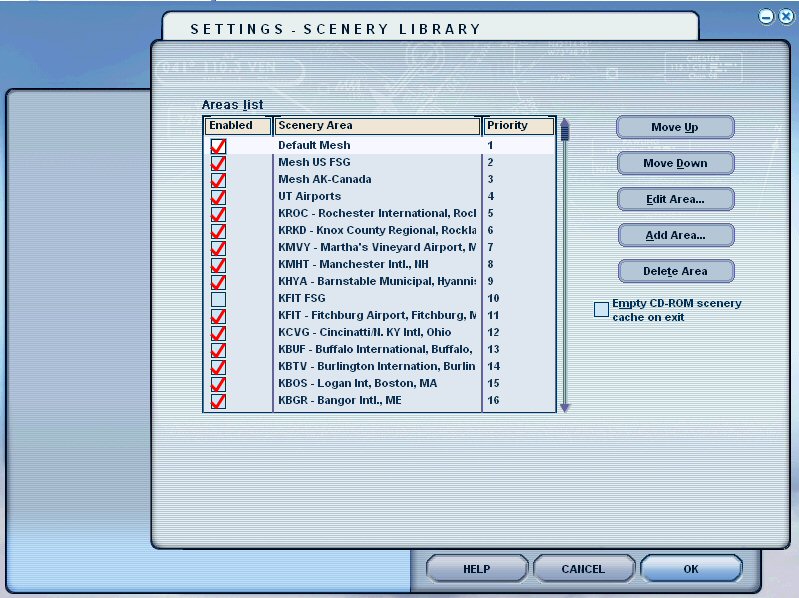
Scenery is stored in directories on your disk (see FSX Directory Structure). Typically, a given scenery or airport library is installed in a directory under FS9\Addon Scenery. For instance FS9\Addon Scenery\XXX, where XXX is the name of the directory containing the scenery library. The XXX directory will contain two more directories, one called "Scenery" and the other called "Texture" (NOT "Textures"!). Their spelling is very important!
Once you have added a scenery library to the list, the order of the libraries in the "Area List" is very important. For all the different types of sceneries, except for mesh, having a lower number value in the list gives it a higher priority, 1 being the highest priority. Those items (except for mesh) at the bottom of the list are read first, and then the libraries are successively drawn on top of the last result as you move higher in the list (towards lower number values). So you will typically want the more important libraries you install higher in the list. I put my terrain files lowest, landclass on top of that, sceneries on top of that, and then the airports. Despite what you might read in some places, landclass is like all other scenery and follows the same priority rules. Most developers suggest you install their landclass libraries with a lower priority than their scenery libraries, but read the directions to be sure.
Mesh libraries are read in the opposite direction. The Mesh library with the lowest number (higher in the list) is read first, and then subsequent mesh libraries are read going downward (towards higher number values). For this reason, I typically move the default LOD 8, 9, and 10 mesh files into their own library, so I can install that library as item 1 in the list. That way, if any scenery has its own mesh, the mesh files of the addon scenery will have a higher priority than the default mesh. Despite the priority order of the mesh, it is my understanding that FS will use an LOD 10 mesh instead of an LOD 9 mesh, and so on. But if you have two LOD 10 meshes, the mesh with the higher priority (higher priority value) will take precedence.
Given these rules, my Addon scenery libraries are in the following order in the Flight Simulator Scenery Library manager window:
1. "Default Mesh" library
2. Addon Mesh libraries
3. Airport libraries
4. General Scenery libraries
5. Roads libraries
6. Default and addon photoreal city libraries
7. Landclass libraries
6. UT City landclass library
7. FSGenesis Landclass library
8. Ultimate Terrain libraries
9. "FreeFlow NE" (normal and modified for UT (see above)) libraries
10. Default Regional Scenery libraries (Scenery\Afri, NAME, etc.)
11. "Corrected Airport Elevations"Library (see
Moving Default Airports)
12. "Default Scenery" library
13. "Default Terrain" library
I highly recommend downloading and installing "Flightsim Manager" (FSM) by Ranainside. Rather than using the primitive Move Up/Move Down buttons in FS's scenery library manager, FSM allows you to easily move items around in groups in the list once you've added the libraries using FS's Scenery Library Editor. And every time I install new addons, I use FSM's checking facilities to check the scenery.cfg file and repair it if necessary (which is often).
 |
||
| Experience real time 3D view control in video games and simulations just by
moving your head! The only true 6DOF head tracking system of its kind, TrackIR takes your PC gaming to astonishing new levels of realism and immersion! |
||
| Coming Soon! |
|
Portals |
||||||
|
SimHQ - The Simulation Community's Headquarters Planesimulation - Flight Simulator 2000, 2002, 2004 and CFS2 add-ons Simviation - taking PC Flight Simulation to the max!
|
||||||
|
Education |
||||||
|
FlightSim.Com How To - VOR-DME Arc Approaches for Pilots
|
||||||
|
Multiplayer |
||||||
|
VATSIM.net - Virtual Air Traffic Flight Simulation Network |
||||||
|
System Performance |
||||||
|
|
||||||
|
Addons and Utilities |
||||||
|
Freeware |
||||||
|
Aircraft Developers |
||||||
|
FlightsimOnline - Milton Shupe daviator.com - Vintage Aircraft for Microsoft Flight Simulator FDX AMM improves aircraft and more... DM Flight Sim - Classic British Jet Airliners for MSFS - David Maltby SimShed - Brian Franklin |
||||||
|
Scenery Developers |
||||||
|
fly-heather.avsim.net - If you're looking for freeware scenery, you'll find it here.
|
||||||
|
Utilities |
||||||
|
The Official Peter Dowson Page - FSUIPC, WideFS, and much more... Airport for Windows - Graphical Airport Design Software FlightSim Stuff - Jim Keir's Utilities |
||||||
|
Payware |
||||||
|
Full Service Providers |
||||||
|
|
||||||
|
Aircraft Developers |
||||||
|
|
||||||
|
Scenery Developers |
||||||
|
|
||||||
|
Utilities |
||||||
|
|




















 . . . enhancing the nature of Microsoft Flight Simulator since 1996 . . .


 Airport scenery around the world
 Enhance your weather for MSFS
 The Premier Cockpit Environment for FS2004
 "Edit Flight Simulator Panels with ease!"
 Enhance the realism of your MSFS ATC
 Voice Buddy Interactive Voice Control Version 3.0
 Voice Activated Interactive ATC for MSFS
Looking to Learn?
Here are some links to tutorials covering various aspects or Microsoft Flight Simulator, from navigation to scenery design and other topics. At the bottom of the list are links to other sites containing even more tutorials.
Flying
Av8n.com - A new spin on the perceptions, procedures, and principles of flying
Navigation
FlightSim.Com How To - VOR-DME Arc Approaches for Pilots
Scenery Design
Moving Default Airports 2 - Scott Gridley
Installation Management
Further sites with tutorials and other learning tools and forums
Using an XBox 360 Controller with FSX
Microsoft Flight Simulator Century of Flight Portals
 Online - One of
THE BEST Flight Simulator portals/File Library/Forum sites
Online - One of
THE BEST Flight Simulator portals/File Library/Forum sites
 -
"The World's #1 Flightsim Site"
-
"The World's #1 Flightsim Site"
SimHQ - The Simulation Community's Headquarters
Planesimulation - Flight Simulator 2000, 2002, 2004 and CFS2 add-ons
Simviation - taking PC Flight Simulation to the max!
 FS-GS - Great forum for learning to use Paint Shop Pro and Photoshop!
 -
Some great scenery for Florida, New England, Bermuda, and the Bahamas, as well
as tutorials and other great stuff
-
Some great scenery for Florida, New England, Bermuda, and the Bahamas, as well
as tutorials and other great stuff
 - Dedicated to the development and support of combat aircraft for MSFS, CFS2, CFS3 and other simulations
|

|

|
|
All rights reserved.




